
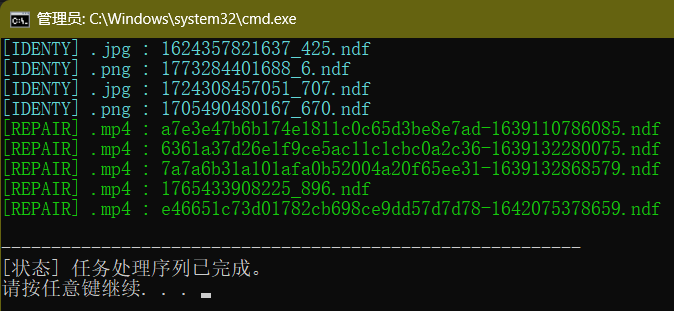
基于文件头的二进制标志识别。检测到人工桌面的视频头(开头有00 00的)自动删除头恢复成视频,检测到图片特征自动重命名补全扩展名。
以下内容存为bat文件即可开始使用。修复后的文件和bat自身同目录。
单文件转换:双击bat,并拖入一个需要恢复成正常文件的.ndf资源文件
多文件转换:大量.ndf资源文件拖拽到刚才创建的bat文件图标上(一次不要太多)
<# :
@echo off
setlocal

:: 1. 输入路径预处理
if "%~1"=="" (
    echo [INFO] 请拖入文件或粘贴路径:
    set /p "MY_INPUT_PATHS=路径: "
) else (
    set "MY_INPUT_PATHS=%*"
)

:: 2. 环境上下文
set "MY_BAT_DIR=%~dp0"

:: 3. 调用 PowerShell 内核执行逻辑
powershell -NoProfile -ExecutionPolicy Bypass -Command "IEX ([System.IO.File]::ReadAllLines('%~f0', [System.Text.Encoding]::Default) -join [Environment]::NewLine)"

echo.
echo ----------------------------------------------------------
echo [状态] 任务处理序列已完成。
pause
exit /b
#>

# 从环境变量获取数据
$rawInput = $env:MY_INPUT_PATHS
$targetDir = $env:MY_BAT_DIR
if (-not $rawInput) { exit }

# ============================================================
# 维护字典:多媒体特征码数据库 (格式: ".后缀" = @(偏移量, 字节序列))
# ============================================================
$Signatures = @{
    ".mp4"  = @(4, 0x66, 0x74, 0x79, 0x70) # ftyp 标识
    ".jpg"  = @(0, 0xFF, 0xD8)             # JPEG 起始符
    ".png"  = @(0, 0x89, 0x50, 0x4E, 0x47) # PNG 标识
    ".gif"  = @(0, 0x47, 0x49, 0x46)       # GIF 标识
    ".bmp"  = @(0, 0x42, 0x4D)             # Windows 位图标识
    ".webp" = @(8, 0x57, 0x45, 0x42, 0x50) # WEBP 容器标识
}

# 解析输入路径并过滤空项
$pathList = [regex]::Matches($rawInput, '(?<=")[^"]+(?=")|[^\s"]+') | ForEach-Object { $_.Value } | Where-Object { -not [string]::IsNullOrWhiteSpace($_) }

foreach ($sourcePath in $pathList) {
    $sourcePath = $sourcePath.Trim()
    if (-not (Test-Path $sourcePath -PathType Leaf)) { continue }

    $fileStream = $null
    try {
        # 以只读模式打开源文件流
        $fileStream = [System.IO.File]::OpenRead($sourcePath)
        if ($fileStream.Length -lt 16) { $fileStream.Close(); continue }

        # 读取头部 16 字节缓冲区
        $buffer = New-Object byte[] 16
        [void]$fileStream.Read($buffer, 0, 16)

        # 1. 检测特定冗余头 (00 00) 并确定全局逻辑偏移
        $logicOffset = if ($buffer[0] -eq 0 -and $buffer[1] -eq 0) { 2 } else { 0 }
        $isRepairNeeded = ($logicOffset -eq 2)

        # 2. 匹配特征库确定目标后缀
        $detectedExt = ".dat"
        foreach ($entry in $Signatures.GetEnumerator()) {
            $extKey = $entry.Name
            $sigPos = $entry.Value[0]
            $sigBytes = $entry.Value[1..($entry.Value.Count-1)]

            $isMatch = $true
            for ($i = 0; $i -lt $sigBytes.Count; $i++) {
                if ($buffer[$logicOffset + $sigPos + $i] -ne $sigBytes[$i]) {
                    $isMatch = $false; break
                }
            }
            if ($isMatch) { $detectedExt = $extKey; break }
        }

        # 3. 构造输出物理路径
        $fileNameNoExt = [System.IO.Path]::GetFileNameWithoutExtension($sourcePath)
        $outputFilePath = [System.IO.Path]::Combine($targetDir, ($fileNameNoExt + $detectedExt))

        # 4. 执行物理持久化操作
        if ($isRepairNeeded) {
            # 修复逻辑:跳过冗余头并写入新文件
            Write-Host "[REPAIR] $detectedExt : $(Split-Path $sourcePath -Leaf)" -ForegroundColor Green
            $destStream = [System.IO.File]::Create($outputFilePath)
            [void]$fileStream.Seek(2, [System.IO.SeekOrigin]::Begin)
            $fileStream.CopyTo($destStream)
            $destStream.Close()
        } else {
            # 识别逻辑:归拢副本至脚本目录
            $fileStream.Close()
            $sourceFullName = (Get-Item $sourcePath).FullName
            if ($sourceFullName -ne $outputFilePath) {
                Copy-Item $sourcePath -Destination $outputFilePath -Force
                Write-Host "[IDENTY] $detectedExt : $(Split-Path $sourcePath -Leaf)" -ForegroundColor Cyan
            }
        }
    } catch {
        Write-Host "[ERROR] 无法处理文件: $sourcePath" -ForegroundColor Red
    } finally {
        if ($fileStream) { $fileStream.Close() }
    }
}